NEWVenvera speaks your language: the full platform, in English, German, Spanish and Bulgarian.See what’s new →
Features
How Venvera Speeds Up GRC Processes
·Alexander Sverdlov
The Problem: GRC on Spreadsheets and Email
Let's be honest about how most organisations handle governance, risk, and compliance today. The typical setup looks something like this:
A shared drive with dozens of Excel files - one for the risk register, one for the asset inventory, one for each framework's control list, one for vendor assessments, and several more that nobody remembers creating
Email threads for everything - requesting evidence from control owners, chasing policy approvals, notifying management about incidents, coordinating audit responses
Copy-paste between spreadsheets when the same data is needed in two places - the same provider appears in your DORA register, your NIS2 supply chain assessment, and your ISO 27001 Annex A.15 evidence folder
Manual status tracking - someone (usually the compliance lead) spends hours every week updating a master tracker to figure out where things stand
Board reports assembled by hand - pulling numbers from five different spreadsheets into a PowerPoint deck the night before the board meeting
This approach worked when organisations had one framework to worry about. It breaks down completely when you are managing DORA, GDPR, ISO 27001, NIS2, and possibly SOC 2 or the AI Act at the same time.
The real cost of spreadsheets is not the time spent filling them in - it is the time spent figuring out what needs filling in, chasing the people who should fill it in, and reconciling the data when it does not match across files.
Where the Time Actually Goes
When we talk to compliance teams, the same time sinks come up again and again. Here is a realistic breakdown of where a compliance lead's week goes in a spreadsheet-and-email world - and what changes with Venvera.
1. Knowing What to Do Next
Manual (Spreadsheet + Email)
With Venvera
You read the regulation (or a consultant's summary), try to break it into actionable steps, map those steps to your current state by reviewing multiple spreadsheets, and build a project plan in yet another spreadsheet. For a new framework like DORA, this initial scoping exercise is slow and easy to get wrong.
Open the framework dashboard. The Compliance Roadmap shows ordered steps with auto-detected progress. Click "Generate Tasks" - every incomplete step becomes an assigned task with a deadline, so your project plan is generated in one step.
2. Gap Assessment
Manual
With Venvera
You hire a consultant or download a checklist, work through it in Excel, colour-code cells green/amber/red, and try to calculate an overall score. When requirements change or you make progress, you update cells manually. There is no automatic connection between the gap assessment and the work you are actually doing.
Venvera has a structured gap assessment for every framework (GDPR, DORA with 48 questions, ISO 27001, NIS2 with 10 pillars, AI Act with 50 questions, and more). Answer the questions, and your compliance score updates in real time on the dashboard. The score is always current because it is connected to your live data.
3. Risk Management
Manual
With Venvera
The risk register is an Excel file with columns for likelihood, impact, owner, treatment plan, and status. Someone updates it quarterly (if you are lucky). The risk heatmap is a separate chart that someone rebuilds manually each time. There is no link between risks and the controls that mitigate them. When management asks "what is our risk posture?", someone has to build a summary by hand.
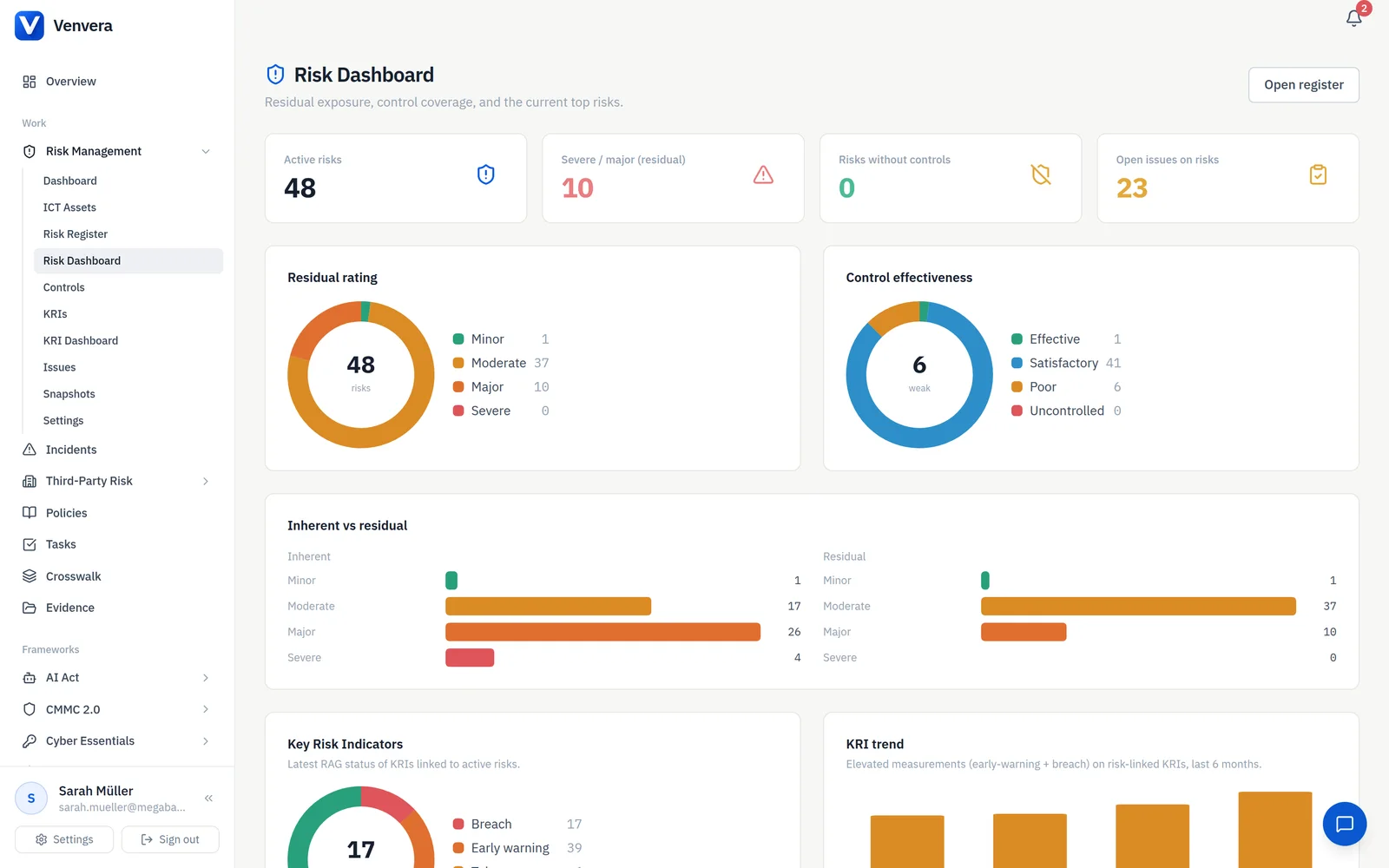
Venvera's Risk Management module gives you an interactive 5×5 heatmap, risk distribution by category, risk appetite indicators, and a controls coverage breakdown - all live, all the time. Risks are linked to controls. Risk snapshots capture your posture at a point in time for trend analysis. The board report is generated with one click.
4. Third-Party / Vendor Risk
Manual
With Venvera
You email a questionnaire (Word or Excel) to each vendor. Some reply in a week. Some never reply. You chase them by email. When responses come back, you score them manually, record results in yet another spreadsheet, and try to remember to follow up on critical findings. For DORA, you then copy provider data into the Register of Information spreadsheet. For NIS2, you copy it again into the supply chain assessment.
Venvera's TPRM module sends questionnaires via secure tokenised links - no email attachments. Responses are scored automatically with risk ratings (Critical/High/Medium/Low). The provider data you enter once feeds into your DORA Register of Information, NIS2 supply chain assessment, ISO 27001 supplier controls, and concentration risk analysis - automatically.
💡 The multiplier effect: If you manage 50 ICT providers and comply with NIS2, ISO 27001 and DORA, the manual approach requires entering each provider's details in at least 3 separate spreadsheets. With Venvera, you enter it once.
5. Policy Management
Manual
With Venvera
Policies live as Word documents on a shared drive. Version control means renaming files ("ICT_Security_Policy_v3_FINAL_v2.docx"). The approval workflow is an email chain. Nobody is quite sure which version is current. When audit time comes, you spend hours finding the right version and proving it was approved.
The Policy Library manages the full lifecycle: Draft → In Review → Approved → Archived. Version history is automatic. One-click policy generation creates policies from templates pre-populated with your company data - for all 16 frameworks. Every policy is linked to its framework, has file attachments, and can be downloaded as DOCX.
6. Incident Management
Manual
With Venvera
An incident happens. Someone logs it in a spreadsheet. Someone else emails the DPO. The DPO checks whether it qualifies as a GDPR breach (72-hour clock starts). Separately, the CISO checks whether it meets the NIS2 reporting threshold (24-hour clock starts). Meanwhile, the DORA team checks if it is a major ICT incident. Three different people, three different spreadsheets, three different deadlines - for the same incident.
Log the incident once in the unified Incident Register. Venvera automatically tracks it against every applicable framework: DORA incident management, NIS2 Art. 23 notification deadlines (24h → 72h → 1 month), GDPR Art. 33 breach notification, UAE IA aeCERT reporting, and AI Act Art. 62 serious incident reporting. One entry, all deadlines tracked.
⚠️ Why this matters: Under NIS2, you have 24 hours to send an early warning. Under GDPR, you have 72 hours to notify the supervisory authority. Missing these deadlines has real consequences - fines, enforcement actions, and reputational damage. A spreadsheet does not send you reminders. Venvera tracks every deadline.
7. Controls and Evidence
Manual
With Venvera
You maintain a controls spreadsheet for ISO 27001 (93 Annex A controls), a separate one for SOC 2 (Trust Services Criteria), another for NIST CSF (subcategories), and yet another for Cyber Essentials (5 themes). Many controls overlap - "access control" appears in all four - but you track them independently. Evidence is scattered across email, SharePoint, screenshots, and ticket systems.
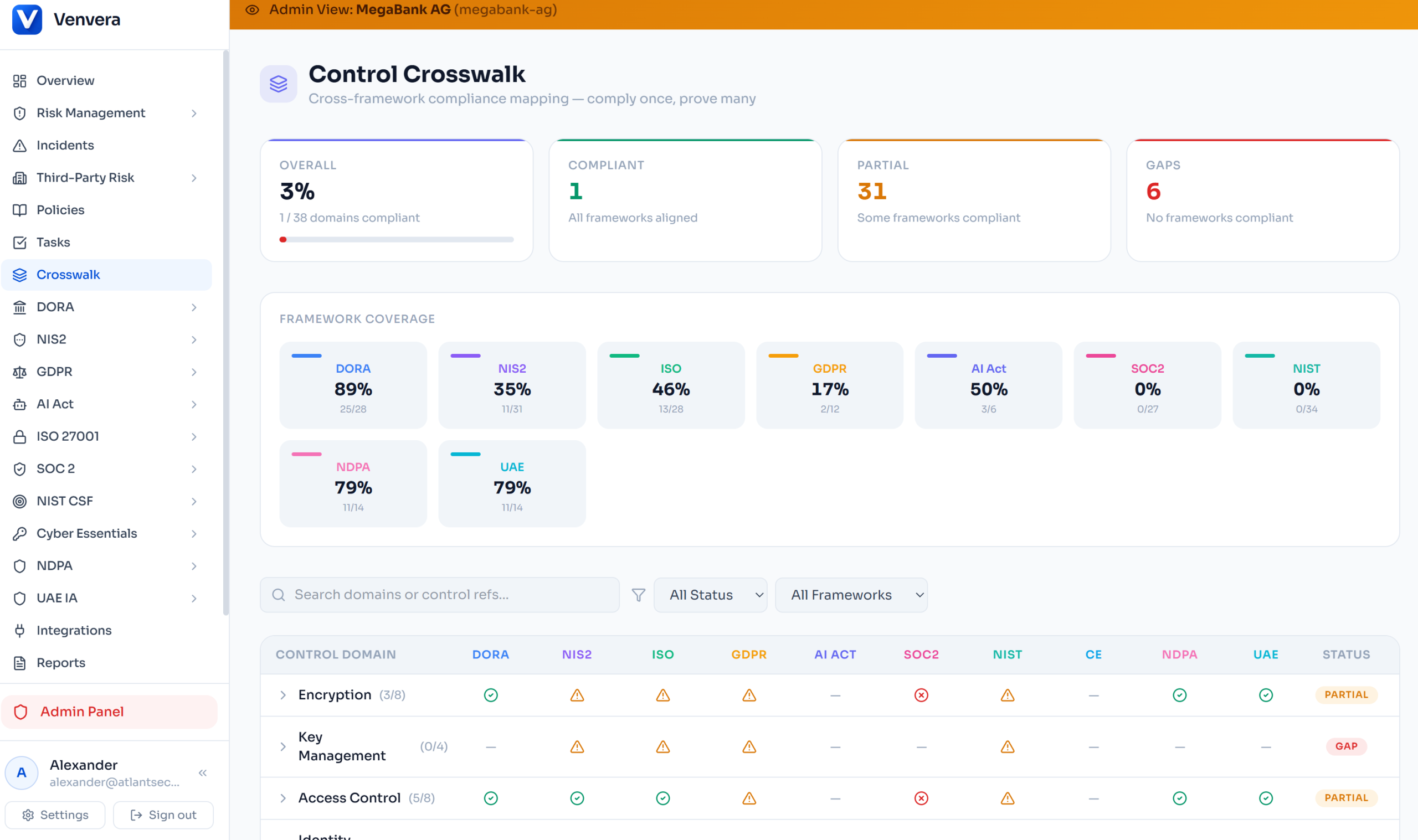
The Controls Library is cross-framework. A single control can satisfy requirements from ISO 27001, SOC 2, NIST CSF, and Cyber Essentials simultaneously. Implementation status (Planned → In Progress → Implemented → N/A) is tracked once and reflected everywhere. Evidence is uploaded directly to controls - encrypted with AES-256-GCM and linked to the relevant framework.
8. Task Management and Accountability
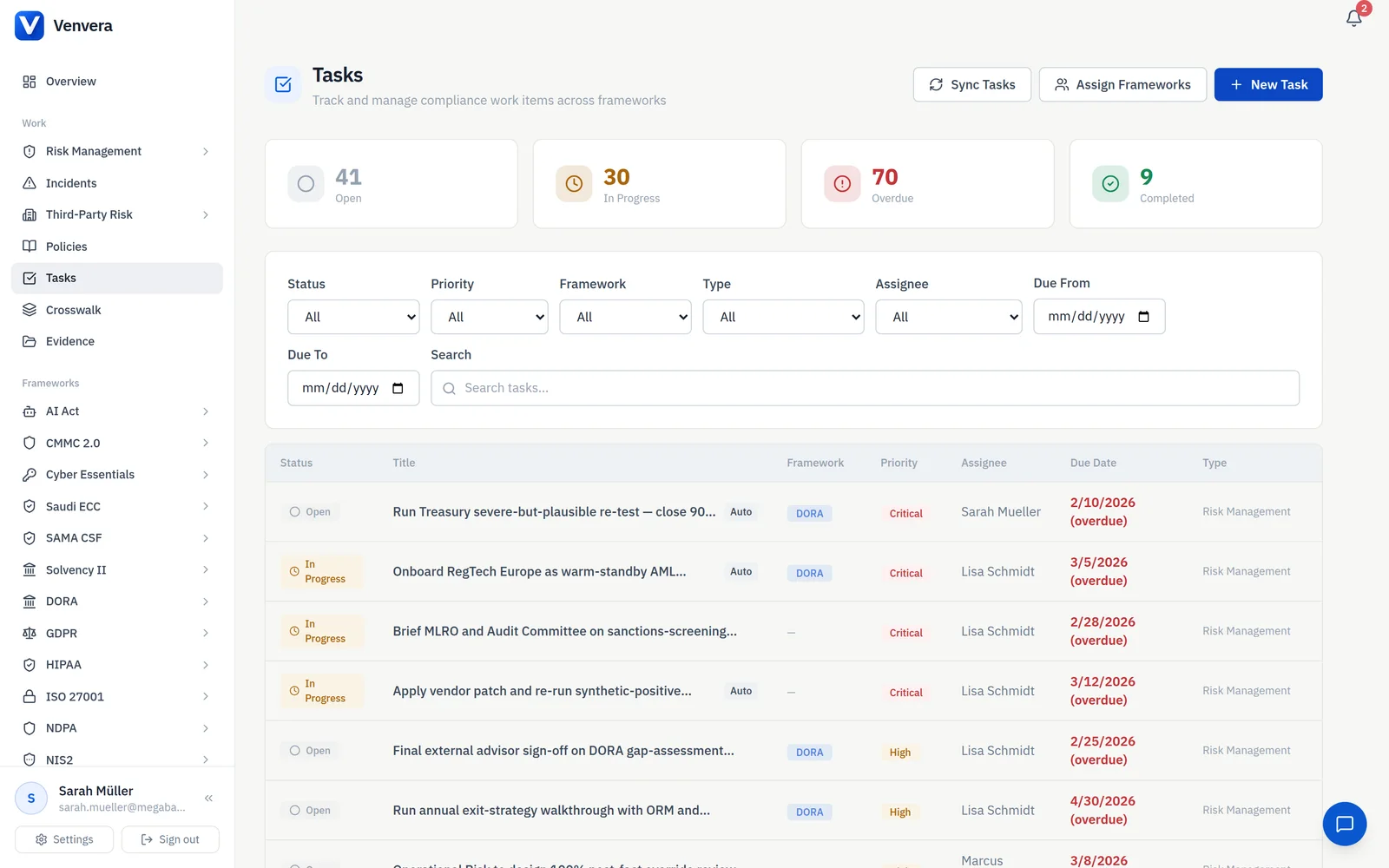
Venvera's task module: every compliance task carries a framework badge, priority, assignee and due date, with overdue items surfaced automatically.
Manual
With Venvera
Compliance tasks are tracked in email, Jira tickets, or a shared spreadsheet. Ownership is unclear. Follow-ups require manual effort. When someone leaves the team, their tasks fall through the cracks. The compliance lead spends hours each week asking "did you do the thing?"
Venvera's Task Management is cross-framework. Tasks have assignees, deadlines, priorities, types, and framework tags. Auto-generated tasks from the Compliance Roadmap ensure nothing is missed. Filter by status, assignee, framework, or type. Everyone sees their own to-do list. No more chasing by email.
9. Regulatory Intelligence
Manual
With Venvera
You subscribe to newsletters from EBA, ESMA, ENISA, and others. Updates arrive in different inboxes. Someone reads them, decides if action is needed, and forwards them to the right people. There is no systematic tracking of who has seen what, or whether action was taken.
The Regulatory Updates feed aggregates publications from 10 sources (EBA, EIOPA, ESMA, ECB, ENISA, EUR-Lex, and more). Each update has an impact level and a status workflow (New → Under Review → Action Needed → Resolved). Acknowledgement tracking shows who has seen each update.
10. Board Reporting
Manual
With Venvera
Board report preparation is a manual assembly job. You pull data from multiple spreadsheets, calculate statistics, build charts, write summaries, format the document, and send it for review. By the time it is presented, some numbers are already outdated. For NIS2, management accountability requirements mean you also need to prove that leadership was briefed - adding another layer of documentation.
Click "Generate Report" in the Reports module. Venvera produces a DOCX board report with current data pulled from live dashboards, across the supported report types. The report is generated on demand rather than assembled by hand. Risk data exports to XLSX for deeper analysis.
The Compound Effect: Multi-Framework Compliance
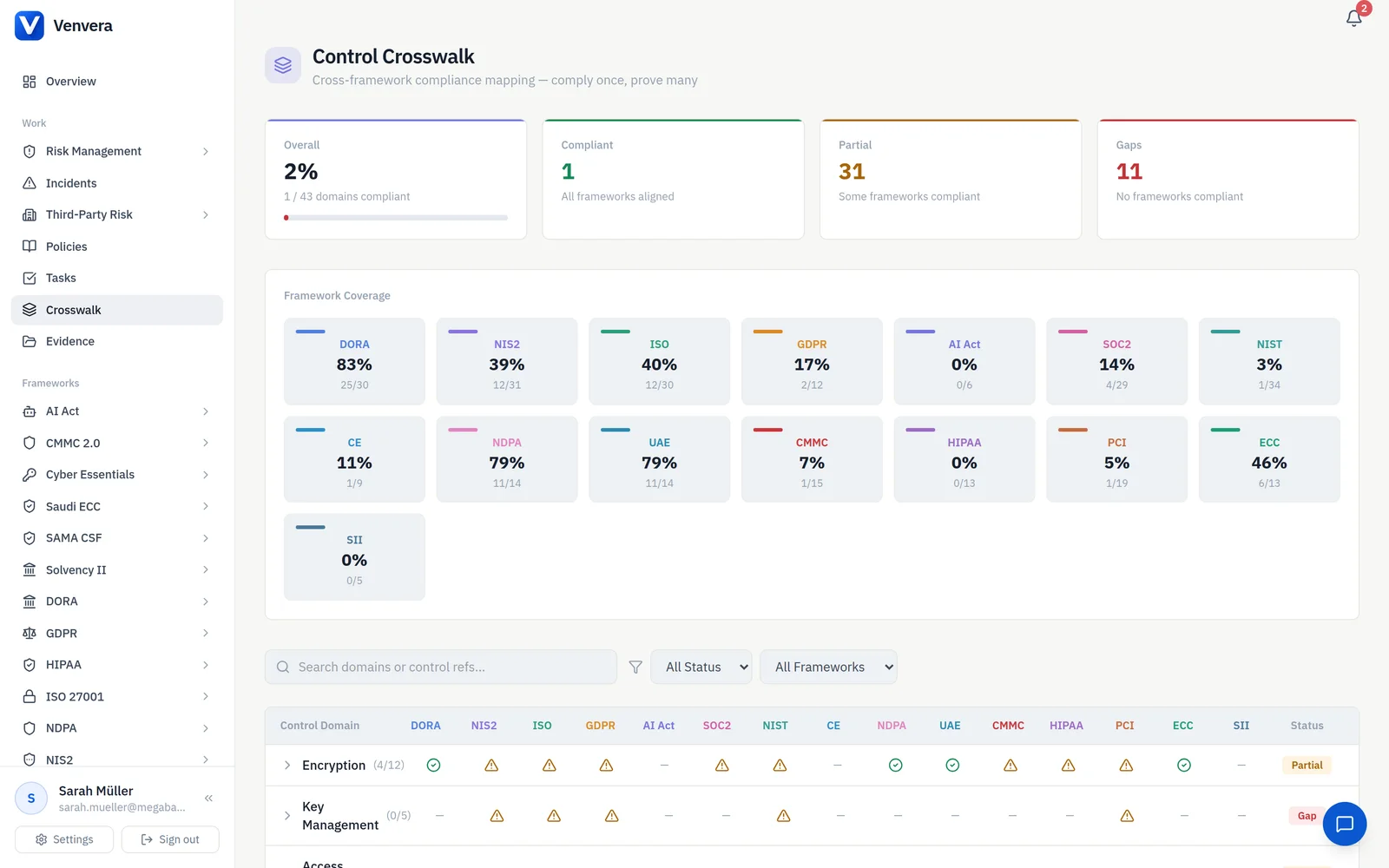
Venvera's control crosswalk is where the compounding happens: one control domain, its status visible across ISO 27001, SOC 2, NIS2, GDPR and DORA.
The inefficiency of manual work does not scale linearly - it scales exponentially with each new framework you add.
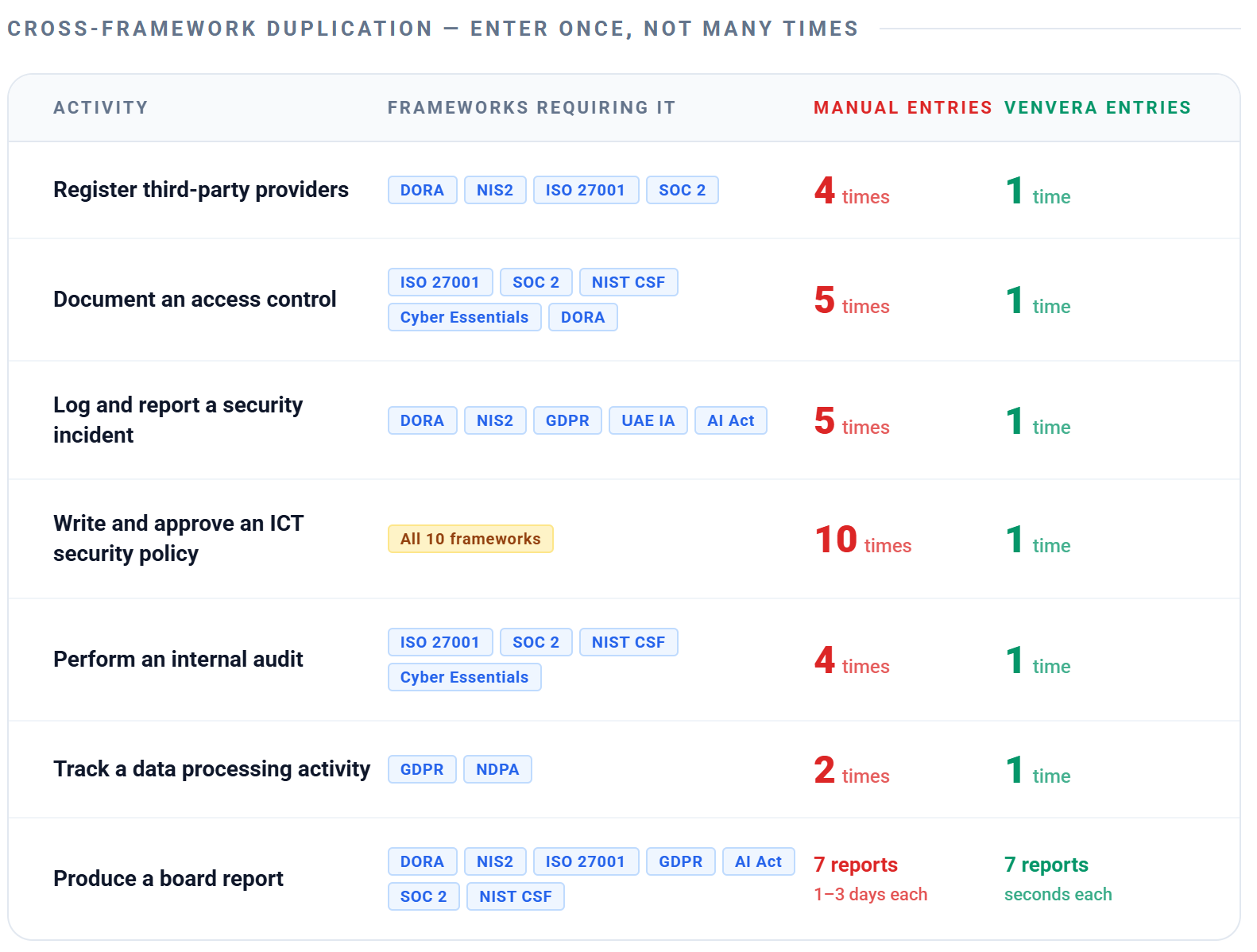
Here is why: each framework introduces its own set of requirements, but many of those requirements overlap with frameworks you are already managing. With spreadsheets, you have no way to capture that overlap. You end up doing the same work multiple times.
Activity
Frameworks That Require It
Manual: Times Duplicated
Venvera: Times Entered
Register third-party providers
ISO 27001, NIS2, SOC 2, DORA
4
1
Document an access control
ISO 27001, SOC 2, NIST CSF, Cyber Essentials, DORA
ISO 27001, NIS2, GDPR, AI Act, SOC 2, NIST CSF, DORA
7 (built by hand)
7 (one click each)
📋 Simple maths: An organisation managing several frameworks with dozens of providers and controls re-enters the same records once per framework with spreadsheets, but only once in Venvera - and that is before accounting for the time lost to version conflicts, stale data, and email chasing.
Where Spreadsheets Fall Short
Beyond the duplication problem, there are things that are hard or impractical with a spreadsheet-based approach:
Capability
Why it is hard with spreadsheets
Real-time compliance scores
A spreadsheet only reflects the moment it was last updated. There is no live connection to your actual data. The dashboard score in Venvera updates the instant you add a provider, implement a control, or close an incident.
Row-level security
If your Excel file is shared, everyone sees everything. With Venvera, PostgreSQL RLS ensures that every query is scoped to your organisation at the database level. No code bug - and no misconfigured sharing link - can expose another tenant's data.
Immutable audit trail
Anyone can edit a cell in Excel and the original value is lost. Venvera's audit log is append-only and tamper-proof - every create, update, and delete is recorded with who did it and when. This is the kind of evidence regulators expect.
Automated deadline tracking
A spreadsheet does not send you a reminder that the NIS2 24-hour early warning deadline is about to expire. Venvera's Art. 23 Incident Notification Tracker shows sent, pending, and overdue counts for every statutory deadline.
One-click regulatory submissions
The DORA xBRL-CSV export requires a specific machine-readable format with defined taxonomies. You cannot produce this from a spreadsheet without custom tooling. Venvera generates it natively.
Cloud security integration
Spreadsheets cannot connect to Azure, discover cloud resources, or ingest Defender for Cloud findings. Venvera's Azure/M365 integration does this automatically and maps findings to compliance controls.
Encrypted file storage
Evidence files on a shared drive are only as secure as the drive permissions. Venvera encrypts every file with AES-256-GCM using per-tenant encryption keys.
AI-powered assistance
Spreadsheets cannot answer questions about regulatory requirements. Venvera's AI assistant (Virtual CISO) understands your compliance posture and can advise on next steps, control selection, and regulatory interpretation.
A Day in the Life: Compliance Lead
Here is what a typical day looks like for a compliance lead - before and after Venvera.
Before Venvera
Time
Activity
09:00
Open email. 14 messages about vendor questionnaires - 3 completed, 2 bounced, 9 asking for deadline extensions. Forward each to the right team member.
09:45
Open the DORA risk register spreadsheet. Realise it was last updated 3 weeks ago. Email risk owners to request updates.
10:15
Board meeting in 2 days. Start pulling numbers for the quarterly compliance report. Open 5 different spreadsheets.
11:30
Security team reports a potential data breach. Check if it meets the GDPR 72-hour threshold. Also check NIS2 and DORA thresholds. Open three different guidance documents.
12:00
Lunch (at desk, while updating the ISO 27001 controls spreadsheet).
13:00
Chase 4 control owners for evidence needed for the upcoming SOC 2 audit. Send email reminders. Two bounce because the people have changed roles.
14:30
Continue board report. Discover the numbers in the risk spreadsheet do not match the numbers in the controls spreadsheet. Spend an hour reconciling.
16:00
Colleague asks "where are we on NIS2 compliance?" Open the NIS2 tracker. It is out of date. Promise to update it by end of week.
17:30
Still working on the board report. Will probably finish it tomorrow evening.
After Venvera
Time
Activity
09:00
Open Venvera. Check Tasks - 3 overdue, 7 due this week. Reassign 2 tasks from the colleague who changed roles.
09:15
Check TPRM dashboard. 3 vendor questionnaires completed overnight - scores calculated automatically. Send 2 follow-up campaigns with one click.
09:30
Board meeting in 2 days. Go to Reports. Generate NIS2, GDPR and DORA board reports. Three DOCX files, ready in seconds.
09:45
Security team reports a potential data breach. Log it in the Incident Register. Venvera automatically tracks it against GDPR, NIS2 and DORA deadlines. The Art. 23 tracker updates instantly.
10:00
Open the DORA dashboard - compliance score is 72%, up from 68% last month. Check the Compliance Roadmap to see the next 3 steps. One of them is already complete - auto-detected from yesterday's work.
10:15
Colleague asks "where are we on NIS2 compliance?" Share screen. Open the NIS2 dashboard. The answer is right there: 64%, with pillar bars showing exactly where the gaps are.
10:30
Start working on actual compliance improvements - implementing controls, reviewing policies, conducting risk assessments - instead of administrating spreadsheets.
💡 The shift: With spreadsheets, the compliance lead spends most of the day administrating the compliance programme (updating trackers, chasing people, reconciling data). With Venvera, that time is spent actually improving compliance (implementing controls, closing gaps, reducing risk).
Where the Time Goes Back
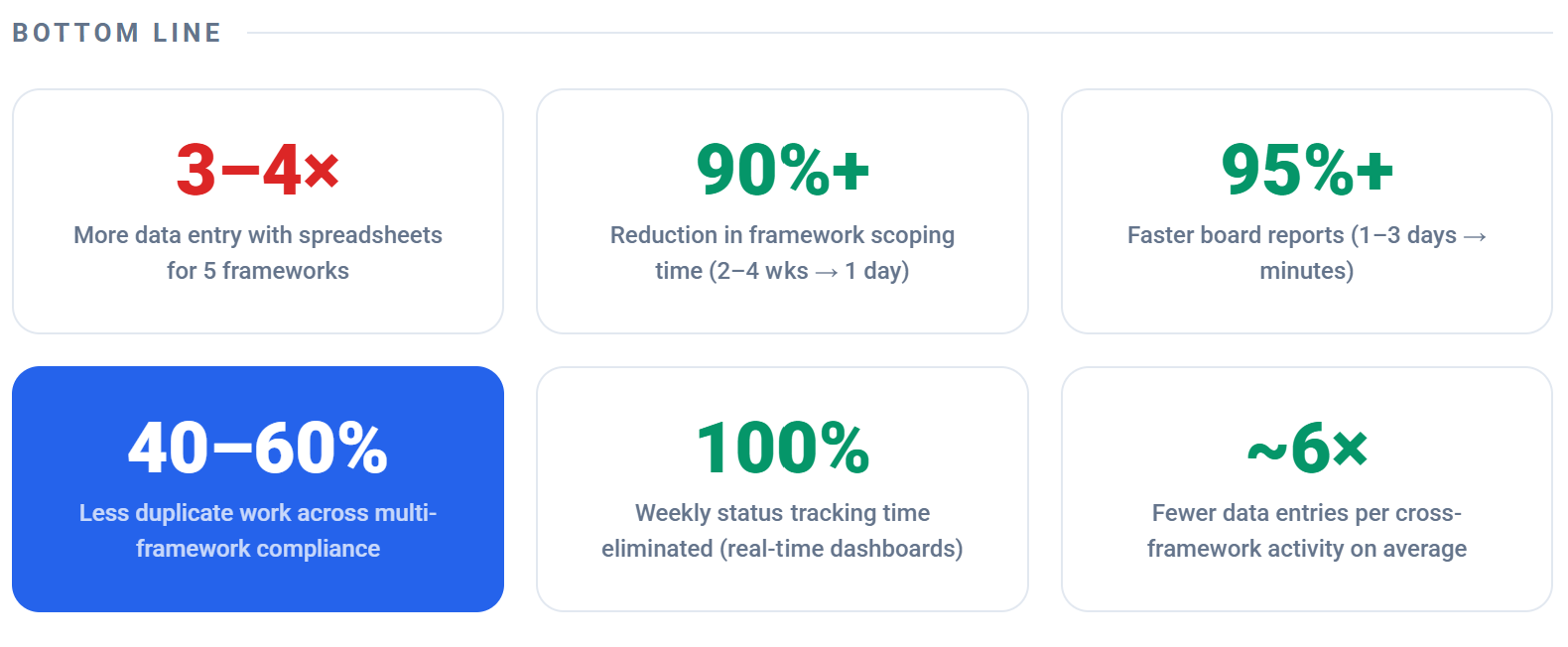
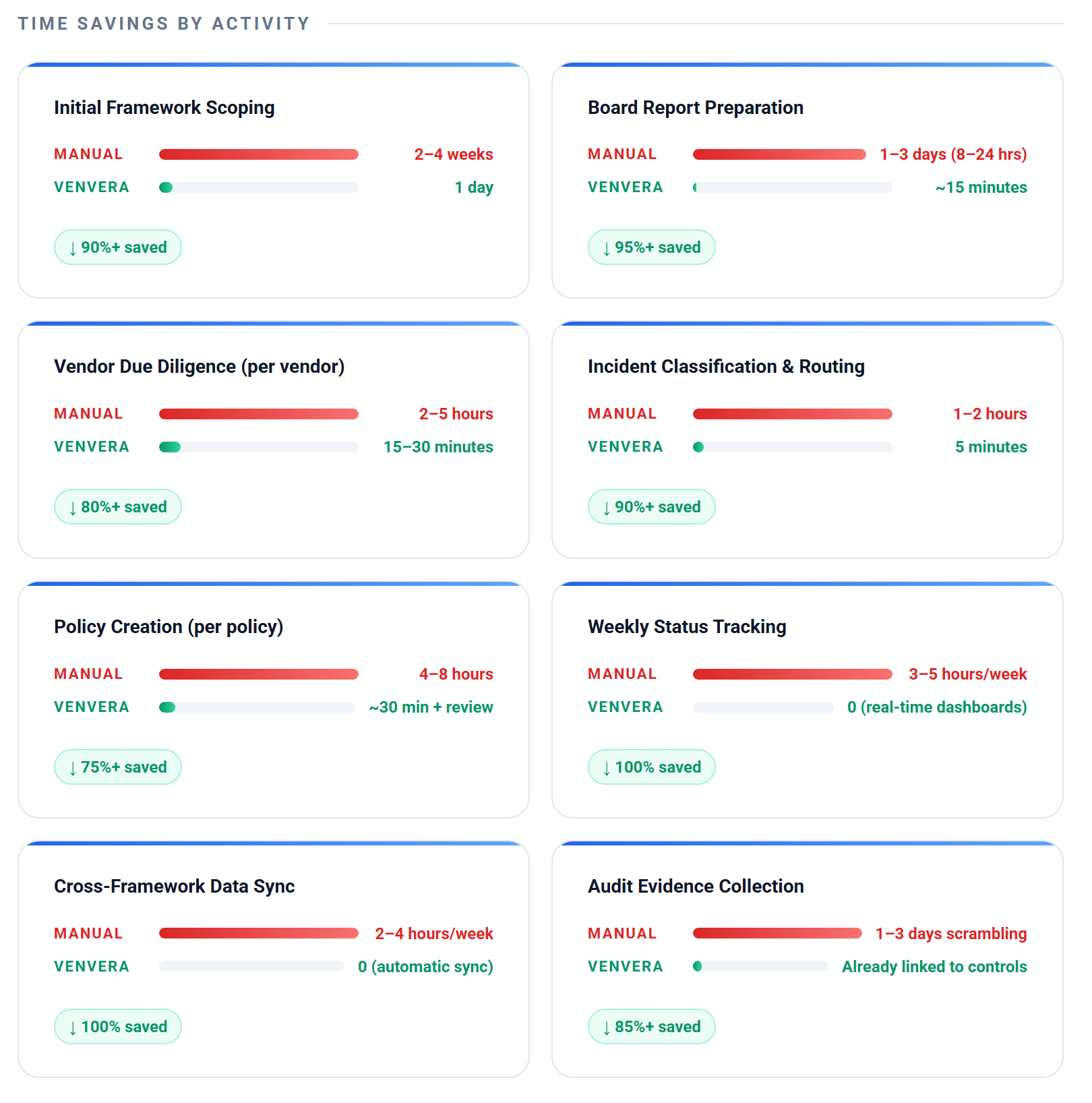
The size of the saving depends on your team, your frameworks, and how much duplicated work you carry today, so we do not publish a single headline number. What changes is the shape of the work. The activities that eat a compliance week with spreadsheets - scoping a new framework, preparing board reports, running vendor due diligence, classifying incidents against several regimes, drafting policies, weekly status tracking, and keeping data in sync across frameworks - move from manual assembly to generated-on-demand or automatic.
Framework scoping becomes a guided roadmap instead of a from-scratch project plan.
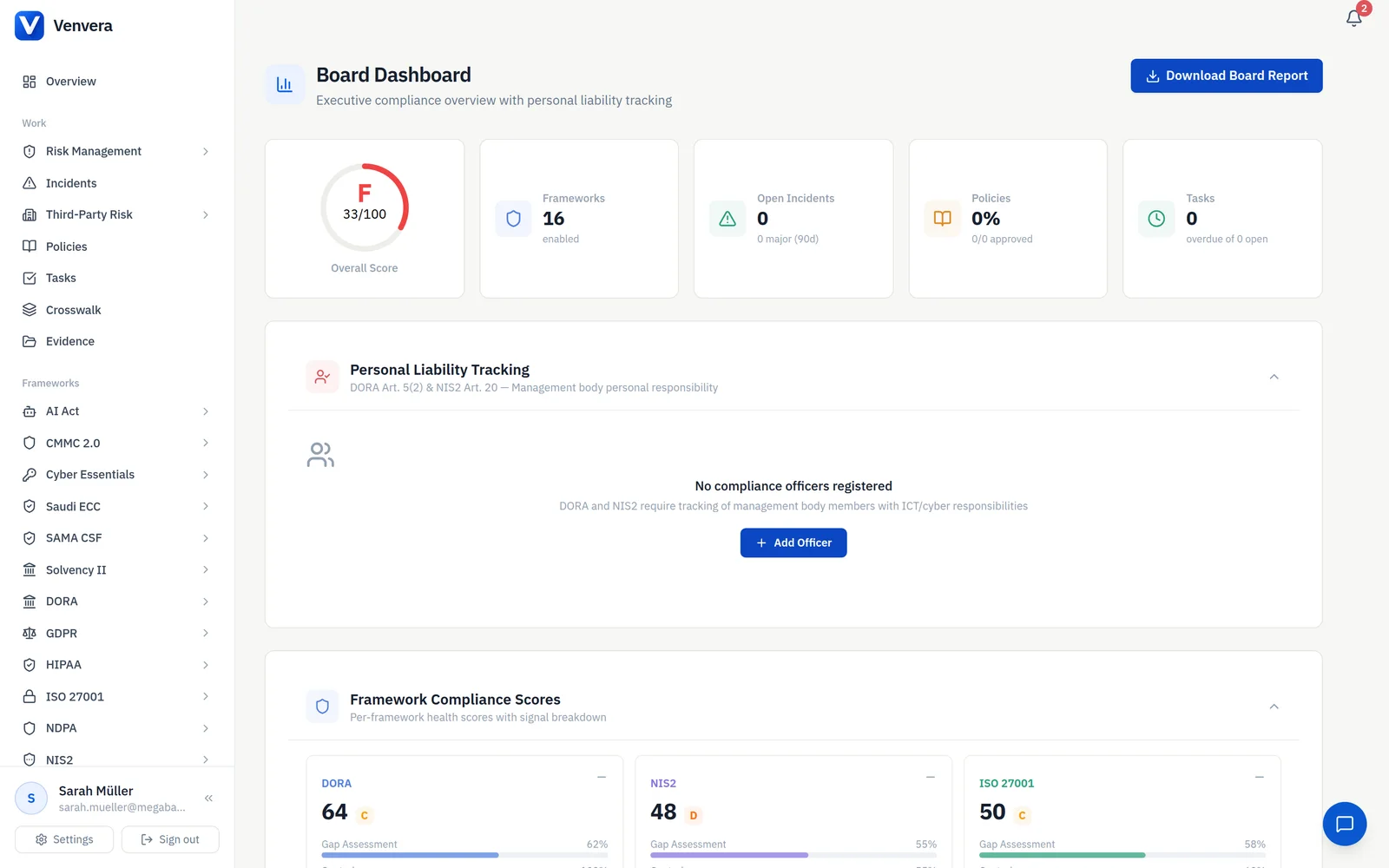
Board reports are generated from live data rather than assembled by hand from several spreadsheets.
Vendor due diligence uses tokenised questionnaires and automatic scoring instead of emailed attachments and manual scoring.
Incident classification is logged once and tracked against every applicable framework, rather than triaged separately per regime.
Policy creation starts from a pre-populated draft for review instead of a blank document.
Status tracking and cross-framework data sync come from live dashboards, so the recurring weekly update work largely disappears.
Audit evidence is already linked to controls, so it does not have to be gathered from scratch at audit time.
The point is not a specific percentage. It is that the recurring, low-value admin work shrinks, and the time it frees goes into actual compliance improvement.
The Hidden Costs of Spreadsheets
Time savings are the most visible benefit, but there are other costs that spreadsheets impose on your organisation:
Compliance risk from stale data
When a regulator asks "what is your current risk posture?", the answer should not be "let me update the spreadsheet first." Stale data means you cannot answer supervisory queries accurately, and inaccurate reporting can trigger enforcement action in its own right.
Key person dependency
In most spreadsheet-based programmes, one or two people understand the file structure, the formulas, and where everything lives. When they leave, the organisation is left with files that nobody fully understands. Venvera structures compliance data in a way that any authorised team member can navigate.
Audit readiness
When auditors arrive (internal or external), they ask for evidence. With spreadsheets, this means scrambling to find the right version of the right file in the right folder. With Venvera, evidence is linked directly to controls, audit records are structured, and the audit trail proves the chain of custody.
Version conflicts and data loss
Two people editing the same spreadsheet simultaneously? One person's changes get overwritten. A file accidentally deleted from the shared drive? Hope you had backups. Venvera handles concurrent access, version history, and automated encrypted backups natively.
No segregation of duties
A spreadsheet has no concept of "this person can view but not edit" or "this person can only see DORA data, not GDPR data." Venvera's role-based access control with per-framework gating ensures that people see exactly what they should - and nothing more.
When Does the Switch Make Sense?
If any of the following are true, you have outgrown spreadsheets:
You are managing more than one compliance framework
You have more than two people working on compliance
Your board or management asks for regular compliance reports
You need to submit regulatory filings (DORA ROI, NIS2 notifications, NDPA CARs)
You have external audit requirements (ISO 27001 certification, SOC 2 Type 2)
You manage more than 10 third-party providers
You spend more time tracking compliance work than doing it
📋 The test is simple: If you can answer the question "where are we on [framework] compliance?" in under 10 seconds with your current tools, you are fine. If the answer is "let me check the spreadsheet and get back to you" - it is time for Venvera.
This article describes Venvera capabilities as built and verified in the product as of July 2026, contrasted with a typical spreadsheet-and-email approach. It does not publish quantified time-saving figures because the saving depends on your team, frameworks, and starting point. Venvera supports readiness and coverage work; it does not by itself make an organisation compliant or certified. Confirm regulatory obligations against the applicable regulation or your adviser.
Alexander is the founder of Venvera and a 20+ year veteran of European cybersecurity and compliance. He has led security and risk programmes for regulated financial institutions, fintechs and SaaS companies operating under DORA, NIS2, GDPR, ISO 27001 and the EU AI Act. Before Venvera, he founded Atlant Security, an offensive security consultancy that ran penetration tests, red-team exercises and ISO 27001 readiness programmes for clients across the EU and the Middle East. He writes on the cross-framework realities of running modern compliance: how to map one control to many obligations, where the spreadsheets fall apart, and what regulators are actually asking for once the auditor sits down.


 This approach worked when organisations had one framework to worry about. It breaks down completely when you are managing DORA, GDPR, ISO 27001, NIS2, and possibly SOC 2 or the AI Act at the same time.